Forum Discussion

Khalid0090
Aug 15, 2023Copper Contributor
VBA Help
Hello All, I'm working on a form created by Excel and I want to insert buttons and give them some functionality using VBA. I tried using Macros but I didn't get the result I wanted. This form wil...
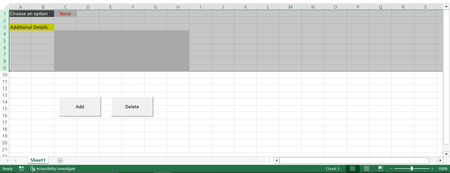
- Aug 15, 2023
Khalid0090 Have a look at the attached.
The buttons are tied to this code:
Sub AddItem()
    Dim targetCell As Range
    With ActiveSheet
        Set targetCell = .Range("A" & .Rows.Count).End(xlUp).Offset(9)
        targetCell.Offset(-11).Resize(10).EntireRow.Copy
        targetCell.EntireRow.Insert xlDown
        targetCell.Offset(-10, 2).Value = 1 'Sets dropdown to 1, change accordingly
        targetCell.Offset(-10, 2).Select
        Application.CutCopyMode = False 'Clear clipboard
    End With
End Sub

Sub RemoveItem()
    Dim targetCell As Range
    With ActiveSheet
        Set targetCell = .Range("A" & .Rows.Count).End(xlUp).Offset(9)
        If targetCell.Row > 20 Then
            targetCell.Offset(-11).Resize(10).EntireRow.Delete
        Else
            MsgBox "Cannot delete first entry"
        End If
    End With
End Sub

Khalid0090
Aug 15, 2023Copper Contributor
Thank you so much for your response, I really appreciate it. One thing to ask for, is there any way to reset the additional details field as well (Same as the drop-down list) it will be super helpful. And if I want to add another field under the "Choose an option" field, where should I add it in the VBA code? and how
Thank you again.

JKPieterse
Aug 16, 2023Silver Contributor
Khalid0090 Replace all of the code with this:
Option Explicit

Const ROWSPERSECTION As Long = 10

Sub AddItem()
    Dim targetCell As Range

    With ActiveSheet
        Set targetCell = .Range("A" & .Rows.Count).End(xlUp).Offset(ROWSPERSECTION - 1)
        targetCell.Offset(-ROWSPERSECTION).Resize(ROWSPERSECTION).EntireRow.Copy
        targetCell.EntireRow.Insert xlDown
        targetCell.Offset(-ROWSPERSECTION, 2).Value = 1 'Sets dropdown to 1, change accordingly
        targetCell.Offset(-ROWSPERSECTION + 3, 2).MergeArea.ClearContents 'Clear details box
        targetCell.Offset(-ROWSPERSECTION, 2).Select
        Application.CutCopyMode = False 'Clear clipboard
    End With
End Sub

Sub RemoveItem()
    Dim targetCell As Range
    With ActiveSheet
        Set targetCell = .Range("A" & .Rows.Count).End(xlUp).Offset(ROWSPERSECTION - 1)
        If targetCell.Row > 2 * ROWSPERSECTION Then
            targetCell.Offset(-ROWSPERSECTION - 1).Resize(ROWSPERSECTION).EntireRow.Delete
        Else
            MsgBox "Cannot delete first entry"
        End If
    End With
End Sub
This allows you to easily change the size of the section that is copied/removed by editing that top constant "ROWSPERSECTION".
Make sure the two buttons are far enough below the last section to avoid their size to change.