Forum Discussion

mmatherne
Feb 17, 2024Copper Contributor
VBA Color Copier
I am very new to VBA. I have been trying to find the right VBA stuff to use to be able to copy over colors from another sheet. There are 6 different sheets in which I want to change the colors on the...
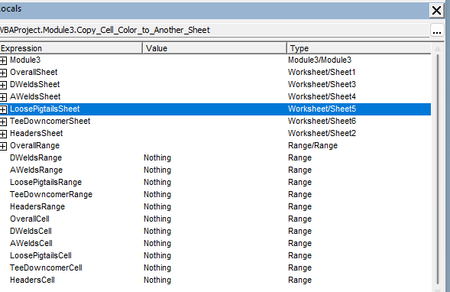

mmatherne
Feb 17, 2024Copper Contributor
For example, this was the original coding I was using when I was just using 3 sheets as a test run. The sheets were labeled: Target, Source, Source2
Sub Copy_Cell_Color_to_Another_Sheet()
Dim sourceSheet As Worksheet
Dim targetSheet As Worksheet
Dim source2Sheet As Worksheet
Dim sourceRange As Range
Dim targetRange As Range
Dim source2Range As Range
Dim sourceCell As Range
Dim targetCell As Range
Dim source2Cell As Range
Set sourceSheet = ThisWorkbook.Worksheets("Source")
Set targetSheet = ThisWorkbook.Worksheets("Target")
Set source2Sheet = ThisWorkbook.Worksheets("Source2")
Set sourceRange = sourceSheet.Range("B16:D18")
Set targetRange = targetSheet.Range("B16:D18")
Set source2Range = source2Sheet.Range("C8:D8,C11:D11")
Set targetRange = targetSheet.Range("C8:D8,C11:D11")
For Each sourceCell In sourceRange
Set targetCell = Cells(sourceCell.Row, sourceCell.Column)
targetCell.Interior.Color = sourceCell.Interior.Color
Next sourceCell
For Each source2Cell In source2Range
Set targetCell = Cells(source2Cell.Row, source2Cell.Column)
targetCell.Interior.Color = source2Cell.Interior.Color
Next source2Cell
End Sub
Sub Copy_Cell_Color_to_Another_Sheet()
Dim sourceSheet As Worksheet
Dim targetSheet As Worksheet
Dim source2Sheet As Worksheet
Dim sourceRange As Range
Dim targetRange As Range
Dim source2Range As Range
Dim sourceCell As Range
Dim targetCell As Range
Dim source2Cell As Range
Set sourceSheet = ThisWorkbook.Worksheets("Source")
Set targetSheet = ThisWorkbook.Worksheets("Target")
Set source2Sheet = ThisWorkbook.Worksheets("Source2")
Set sourceRange = sourceSheet.Range("B16:D18")
Set targetRange = targetSheet.Range("B16:D18")
Set source2Range = source2Sheet.Range("C8:D8,C11:D11")
Set targetRange = targetSheet.Range("C8:D8,C11:D11")
For Each sourceCell In sourceRange
Set targetCell = Cells(sourceCell.Row, sourceCell.Column)
targetCell.Interior.Color = sourceCell.Interior.Color
Next sourceCell
For Each source2Cell In source2Range
Set targetCell = Cells(source2Cell.Row, source2Cell.Column)
targetCell.Interior.Color = source2Cell.Interior.Color
Next source2Cell
End Sub

HansVogelaar
Feb 17, 2024MVP
1) Variables such as DWeldsCell will only have a value inside the loop that refers to them.
2) Have you tried running the code in my previous reply?
- mmatherneFeb 17, 2024Copper Contributorhttps://www.dropbox.com/scl/fi/kj5vcvbrfeuuxqo6ysuxh/Copy-of-Outlet-Progress-Sheet.xlsm?rlkey=89vw4vs667dmvpy98m1y6ghws&dl=0
The code in the previous reply did not work. I have attached the file link for you to reference. Thank you for the help- HansVogelaarFeb 17, 2024MVP
See the attached version - I have corrected the macro.