Forum Discussion

CptWilson11
May 08, 2024Copper Contributor
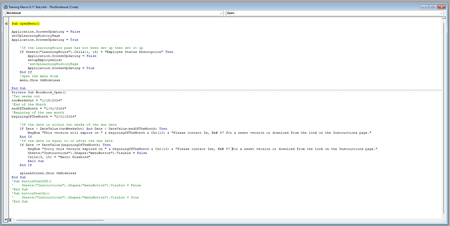
VBA Code - Open Workbook Button Hidden
Hello, TIA! I'm stumped, I'm trying to revive a macro book after the creator left the company. The workbook has an expiration code attached to it and when I extend the dates, the macro doesn't u...
- May 10, 2024
Insert the following line below Private Sub Workbook_Open():
Sheets("Instructions").Shapes("menuButton").Visible = True

HansVogelaar
May 09, 2024MVP
Did you edit the dates in Workbook_Open to future dates, then immediately save the workbook?
 CptWilson11May 09, 2024Copper Contributor
HansVogelaar yes, I have. Which then doesn’t bring up the prompt, so I believe that works.
But the code should make a button visible if it’s not “expired” but it is not. This is my hang up I believe.
- HansVogelaarMay 10, 2024MVP
Insert the following line below Private Sub Workbook_Open():
Sheets("Instructions").Shapes("menuButton").Visible = True
- CptWilson11May 10, 2024Copper ContributorThat did it! Thank you so much!