Forum Discussion

richzip505
Sep 23, 2024Tin Contributor
Variable cell reference for subtraction formula
Hello, If I have the below data, I want to find out the total duration on each employee's last day of work. This would essentially be the end time of the last event, minus the start time of the ...
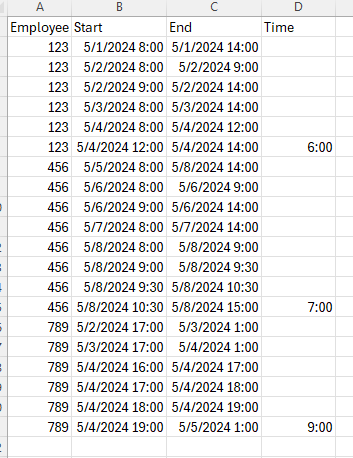
- Sep 23, 2024
In D2:
=IF($A2=$A3, "", $C2-MIN(IF(($A$2:$A$18=$A2)*(INT($B$2:$B$18)=INT($B2)), $B$2:$B$18)))
Adjust the ranges $A$2:$A$18 and $B$2:$B$18 for your setup.
Format D2 as a time, then fill down.


PeterBartholomew1
Sep 23, 2024Silver Contributor
This answer is simply to record a different way of working.
First I wrote a Lambda function to return the last day's hours for an individual employee
HoursLastDayλ
=LAMBDA(empl,
    LET(
        end₁,     MAXIFS(End, Employee, empl),
        day₁,     INT(MAXIFS(Start, Employee, empl)),
        start₀,   MINIFS(Start, Employee, empl, Start, ">=" & day₁),
        duration, end₁ - start₀,
        duration
    )
)
The tricky bit was returning the final datetime from the 'End' column but using the 'Start' column to determine the last date. The worksheet formula then becomes
= LET(
    employeeName, UNIQUE(Employee),
    hours, MAP(employeeName, HoursLastDayλ),
    HSTACK(employeeName, hours)
  )
which results in
(the data for 456 was not entered)