Forum Discussion

Using partial file names in an excel table to match and copy files to a subfolder
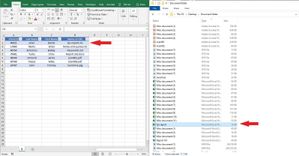

It's slightly different than what I'm attempting but it might work with one change.
Is it possible to set the fileNamePattern to read from a table, an array, or to pull files by matching the first 5 digits to a list in excel?
When I get a delivery it comes with a list of file names, but only that first 5 digit number of each file name. I'd like to be able to take that list, paste it into excel every time I get a delivery, and have it copy the related files to the destination folder automatically.

Sub test()
Dim r%, i%
Dim arr
With Worksheets("Sheet1")
r = .Cells(.Rows.Count, 1).End(xlUp).Row
arr = .Range("a1:e" & r)
For i = 2 To UBound(arr)
SearchAndCopyFiles arr(i,4)
rem column 4 contains the fileNamePattern
Next
End With
End Sub
Sub SearchAndCopyFiles(fileNamePattern)
Dim fso As Object ' FileSystemObject
Dim sourceFolder As String
Dim destinationFolder As String
Dim fileNamePattern As String
Dim file As Object ' File
Dim foundFilesCount As Integer
' Set the source folder path
sourceFolder = "C:\Path\To\Source\Folder"
' Set the destination folder path
destinationFolder = "C:\Path\To\Destination\Folder\Found Files"
' Set the partial file name pattern
rem fileNamePattern = "*20448*"
' Create a FileSystemObject
Set fso = CreateObject("Scripting.FileSystemObject")
' Check if the source folder exists
If Not fso.FolderExists(sourceFolder) Then
MsgBox "Source folder does not exist."
Exit Sub
End If
' Check if the destination folder exists and create it if not
If Not fso.FolderExists(destinationFolder) Then
On Error Resume Next
fso.CreateFolder destinationFolder
On Error GoTo 0
' Check if the creation was successful
If Not fso.FolderExists(destinationFolder) Then
MsgBox "Unable to create the destination folder."
Exit Sub
End If
End If
' Loop through all files in the source folder
For Each file In fso.GetFolder(sourceFolder).Files
' Check if the file name matches the pattern
If fso.GetFileName(file.Path) Like fileNamePattern Then
' Copy the file to the destination folder
fso.CopyFile file.Path, destinationFolder & "\" & fso.GetFileName(file.Path)
foundFilesCount = foundFilesCount + 1
End If
Next file
MsgBox "Found files: " & foundFilesCount
End Sub