Forum Discussion

Using MS Excel to Calculate Rolling Headcount and Turnover
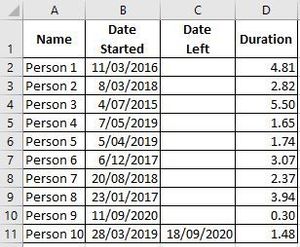
- Dec 31, 2020
1) In H2, enter the following array formula confirmed with Ctrl+Shift+Enter:
=SUMPRODUCT(($B$2:$B$11<=G2)*(IF($C$2:$C$11="",G2,$C$2:$C$11)>=G2))
Fill down.

Thanks! I have my two tables...the first table is all the info related to the employee, start date, department, etc... The second table is where I get my calculations. The date I'm pointing at and the equations for hires, terms, and headcount. I tried to create a relationship between the two tables, but I am not having any luck. Let me know if you need more detail. I can send you the two tables I'm using. Thanks for your help!!

Perhaps you can use PowerQuery and PowerPivot for this, but that's not my forte - I hope that someone else can help. If you don't get new replies here, I'd start a new discussion. That will attract more attention.