Forum Discussion

Using MS Excel to Calculate Rolling Headcount and Turnover
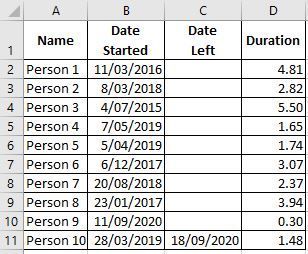
- Dec 31, 2020
1) In H2, enter the following array formula confirmed with Ctrl+Shift+Enter:
=SUMPRODUCT(($B$2:$B$11<=G2)*(IF($C$2:$C$11="",G2,$C$2:$C$11)>=G2))
Fill down.

3) In N2 as an array formula confirmed with Ctrl+Shift+Enter:
=SUM(IF(IF(IF($C$2:$C$11="",EDATE(M2,1),$C$2:$C$11)<EDATE(M2,1),IF($C$2:$C$11="",EDATE(M2,1),$C$2:$C$11),EDATE(M2,1))>IF($B$2:$B$11>M2,$B$2:$B$11,M2),IF(IF($C$2:$C$11="",EDATE(M2,1),$C$2:$C$11)<EDATE(M2,1),IF($C$2:$C$11="",EDATE(M2,1),$C$2:$C$11),EDATE(M2,1))-IF($B$2:$B$11>M2,$B$2:$B$11,M2),0))/(EDATE(M2,1)-M2)
Fill down.

- HansVogelaarSep 28, 2021MVP
I'd create a pivot table based on the raw data, and filter that the way you want.
- sdryfuseSep 28, 2021Copper Contributor
Thanks! I have my two tables...the first table is all the info related to the employee, start date, department, etc... The second table is where I get my calculations. The date I'm pointing at and the equations for hires, terms, and headcount. I tried to create a relationship between the two tables, but I am not having any luck. Let me know if you need more detail. I can send you the two tables I'm using. Thanks for your help!!
- SergeiBaklanSep 28, 2021Diamond Contributor
In general yes, that could be done with data model. It will be great to know on which version of Excel you are and on which platform (Windows, Mac, etc). Plus desirably to have sample file to play with it - that's not 5-minutes job to generate solution.
