Forum Discussion

Using Index+Match with Or function to find nth Value
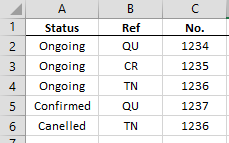
- Feb 21, 2022
Enter the value of n in (for example) E2.
In F2:
=IFERROR(INDEX($C$2:$C$6,SMALL(IF(($A$2:$A$6="Ongoing")*(($B$2:$B$6="QU")+($B$2:$B$6="TN")),ROW($C$2:$C$6)-ROW($C$2)+1),E2)),"")
If you don't have Microsoft 365 or Office 20221, confirm the formula with Ctrl+Shift+Enter.
See the attached sample workbook,

Enter the value of n in (for example) E2.
In F2:
=IFERROR(INDEX($C$2:$C$6,SMALL(IF(($A$2:$A$6="Ongoing")*(($B$2:$B$6="QU")+($B$2:$B$6="TN")),ROW($C$2:$C$6)-ROW($C$2)+1),E2)),"")
If you don't have Microsoft 365 or Office 20221, confirm the formula with Ctrl+Shift+Enter.
See the attached sample workbook,
 Jess_OraFeb 22, 2022Copper Contributor
HansVogelaar Million thanks for your help!!! It really helps on my daily job...
Besides, may I ask one more question:
I have a data list as column A to column D.
Is it possible to sum the total value base on column B (%) & column C (Date)?
For example, I want to know total value from today (F1) to 2 months later (i.e.: 21 Apr 2022) with 50%
(and it should comes a total value 10002+10003 = 20005)
Thanks again.- HansVogelaarFeb 22, 2022MVP
For example:
=SUMIFS($D$2:$D$6, $C$2:$C$6, ">="&TODAY(), $C$2:$C$6, "<"&EDATE(TODAY(), 2), $B$2:$B$6, 50%)