Forum Discussion

ebelleza
May 13, 2025Copper Contributor
Using Filters to Auto-Update Complex Formulas
Hi, This is my first post here. Hoping someone here may be able to assist me. I have the below spreadsheet. There is currently 500 rows of data. At the Top is a Summary Grid with formulas summariz...
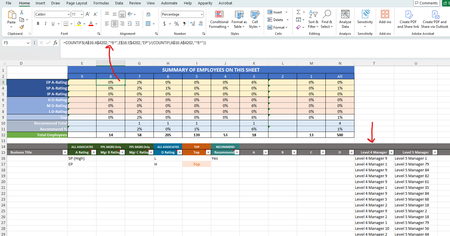
- May 15, 2025
It is
=COUNTIFS( A$16:A$4202,"*8*", Table[IsFiltered], 1 )or
=COUNTIFS( A$16:A$4202,"*8*", Z$16:Z$4202, 1 )

ebelleza
May 13, 2025Copper Contributor
Hi Sergei, thank you for responding to my inquiry. Per your suggestion I created a titled "IsFiltered" in Column Z. I attempted to modify the numerator portion of your suggestion, but the "Table[IsFiltered]" is being highlighted by Excel as not working.
=COUNTIFS(COUNTIF(A$16:A$4202,"*8*"), Table[IsFiltered], 1 )
I attempted to have it reference the data in the column to the below, but now Excel is telling I have too few arguments.
=COUNTIFS(COUNTIF(A$16:A$4202,"*8*"), Z$16:Z$4202, 1 )
How do I correct this?

SergeiBaklan
May 15, 2025Diamond Contributor
It is
=COUNTIFS( A$16:A$4202,"*8*", Table[IsFiltered], 1 )or
=COUNTIFS( A$16:A$4202,"*8*", Z$16:Z$4202, 1 )- ebellezaMay 16, 2025Copper Contributor
Sergei, thank you so much for the clarification. i was able to leverage your second option for my Excel spreadsheet and so far everything is looking good!