Forum Discussion

Using Filters to Auto-Update Complex Formulas
- May 15, 2025
It is
=COUNTIFS( A$16:A$4202,"*8*", Table[IsFiltered], 1 )or
=COUNTIFS( A$16:A$4202,"*8*", Z$16:Z$4202, 1 )

If you add helper column IsFiltered to the table, e.g. =AGGREGATE(3,5,[@ID]), you may modify your formulae as
=COUNTIFS( <current part>, Table[IsFiltered], 1 ) / COUNTIFS( <another part>, Table[IsFiltered], 1)
or like, not sure about divider.
Abstract field ID shall have no blanks. If you have nos uch column, you could add another helper column with, for example, =ROW() in each cell.
Above is for structured table, similar is for ranges.

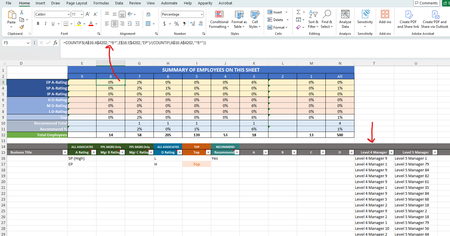
Hi Sergei, thank you for responding to my inquiry. Per your suggestion I created a titled "IsFiltered" in Column Z. I attempted to modify the numerator portion of your suggestion, but the "Table[IsFiltered]" is being highlighted by Excel as not working.
=COUNTIFS(COUNTIF(A$16:A$4202,"*8*"), Table[IsFiltered], 1 )
I attempted to have it reference the data in the column to the below, but now Excel is telling I have too few arguments.
=COUNTIFS(COUNTIF(A$16:A$4202,"*8*"), Z$16:Z$4202, 1 )
How do I correct this?
- SergeiBaklanMay 15, 2025Diamond Contributor
It is
=COUNTIFS( A$16:A$4202,"*8*", Table[IsFiltered], 1 )or
=COUNTIFS( A$16:A$4202,"*8*", Z$16:Z$4202, 1 )- ebellezaMay 16, 2025Copper Contributor
Sergei, thank you so much for the clarification. i was able to leverage your second option for my Excel spreadsheet and so far everything is looking good!