Forum Discussion

Using Data Validation to make drop-downs that reference other cells
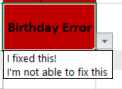

Thanks for your reply mathetes ! Your reading of my situation is accurate in that yes, "Birthday Error" is in the same cell where the other person can enter "I fixed" or "not able"
I prefer not to put the drop down validation choices into an adjacent cell because I think it would make my spreadsheet too overwhelming for the other person as there's lots of other columns being used for other purposes here. There are also not really a finite number of errors, as new types of errors emerge from time to time.
I appreciate that you've suggested alternative solutions, however what I am hoping to do is alter the data validation setup so that whatever is already typed into the cell will show up as a dropdown option in that same cell.
Currently I have it set up as such so that it's referencing my list which contains "I fixed" and "Not able to fix":
But maybe if I use the custom feature in the screenshot below, there will be some way I can write a formula so that it references whatever is already in the cell that is to contain the dropdown menu?
Thanks!

Now, I want to emphasize that the usual application of "Data Validation" would be precisely this: to prevent the kinds of errors that you're seeking to fix. If there are, as you say, lots of other columns being used for other purposes, I'm beginning to wonder whether you could do a massive clean-up and then modify in a major way what the basic design is.
Can I ask that: What is the whole spreadsheet about? Are you using Excel to do mathematical modeling (or financial record keeping) or anything that actually uses the calculation capabilities of Excel? If not that, are you using it--and this is legitimate--as a database, to store info on people who are members of an organization? [The fact that you've got birthdate in there suggests possibly the latter; the fact that health insurance is in there too]
IF what you have is essentially a database, then, yes, you do need valid data, but it's far better to design it so that dates (for example) cannot be entered in an invalid fashion, rather than to jump through hoops to fix incorrectly entered data. And so on... you may not be able to prevent misspellings of names, but you can do things to reduce the likelihood of needing to do the kind of after-the-fact correction you seem to be engaged in.
So, if you don't mind sharing this kind of information--if it's not proprietary--could you either upload a sample of your actual spreadsheet, if not the whole thing, OR, at the very least, provide some sort of description of the bigger picture here, what you're storing and for what purpose. Maybe then some of us can give you some recommendations for preventive actions rather than just helping you put a bandaid on this one.