Forum Discussion

pbarbosa
Apr 29, 2024Brass Contributor
Using Array Lambda Formula C(olumns) and R(ows) times in excel formula
After resolving the https://techcommunity.microsoft.com/t5/excel/using-array-formula-c-olumns-and-r-ows-times-in-excel-formula/m-p/4125426 Thanks HansVogelaar and PeterBartholomew1 ...
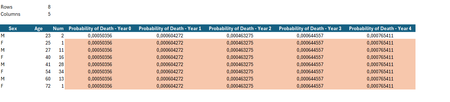
- Apr 29, 2024
Excel doesn't return array of arrays natively. Few variants for the workaround, straightforward one
=LET(
    ages, B7:INDEX(B7:B1000, Rows),
    sexes, B7:INDEX(A7:A1000, Rows),
    DROP( REDUCE("", SEQUENCE(Rows),
    LAMBDA(a,v,
        VSTACK( a,
            LET(
                lim, maxMT,
                age, INDEX(ages,v,1),
                sex, INDEX(sexes,v,1),
                k₁, Rows,
                k₂, Columns,
                scenario, MOD( SEQUENCE(, k₂, 0), k₂),
                            IF( age + scenario >= lim,
                                0,
                                (Lx_l(age + scenario, sex) -
                                Lx_l(age + scenario + 1, sex)) /
                                Lx_l(age, sex)
                            )
            )
        )
    )
), 1) )
see in the first sheet attached.


djclements
May 01, 2024Silver Contributor
pbarbosa Another variant for the probability array could be:
=LET(
    data, A7:B14,
    MAKEARRAY(ROWS(data), B4, LAMBDA(r,c, LET(
        age, INDEX(data, r, 2),
        sex, INDEX(data, r, 1),
        IF(age + c - 1 >= maxMT, 0, (Lx_l(age + c - 1, sex) - Lx_l(age + c, sex)) / Lx_l(age, sex))))
    )
)
Alternatively, you could reorganize the Mortality Table in an "unpivoted" format (with columns for "Age", "Sex" and "k"), then use a SUMIFS-based function to spill the results in a 2D array:
=POD(B7:B14, A7:A14, B4)
Where POD is defined in Name Manager as follows:
POD:
=LAMBDA(age,sex,years,
    LET(
        X, LAMBDA(a,s, SUMIFS(TM[k], TM[Age], a, TM[Sex], s)),
        n, SEQUENCE(, years, 0),
        (X(age + n, sex) - X(age + n + 1, sex)) / X(age, sex)
    )
)
You could also add an optional argument to show the accumulated results, if needed:
POD:
=LAMBDA(age,sex,years,[accum],
    LET(
        X, LAMBDA(a,s, SUMIFS(TM[k], TM[Age], a, TM[Sex], s)),
        n, SEQUENCE(, years, 0),
        p, (X(age + n, sex) - X(age + n + 1, sex)) / X(age, sex),
        IF(accum, DROP(SCAN(0, EXPAND(p,, years + 1), LAMBDA(a,v, IF(ISNA(v), 0, a + v))),, -1), p)
    )
)
Then set the optional [accum] argument to TRUE:
=POD(B7:B14, A7:A14, B4, TRUE)
See attached workbooks...