Forum Discussion

Using Array Lambda Formula C(olumns) and R(ows) times in excel formula
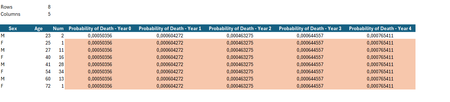
- Apr 29, 2024
Excel doesn't return array of arrays natively. Few variants for the workaround, straightforward one
=LET(
    ages, B7:INDEX(B7:B1000, Rows),
    sexes, B7:INDEX(A7:A1000, Rows),
    DROP( REDUCE("", SEQUENCE(Rows),
    LAMBDA(a,v,
        VSTACK( a,
            LET(
                lim, maxMT,
                age, INDEX(ages,v,1),
                sex, INDEX(sexes,v,1),
                k₁, Rows,
                k₂, Columns,
                scenario, MOD( SEQUENCE(, k₂, 0), k₂),
                            IF( age + scenario >= lim,
                                0,
                                (Lx_l(age + scenario, sex) -
                                Lx_l(age + scenario + 1, sex)) /
                                Lx_l(age, sex)
                            )
            )
        )
    )
), 1) )
see in the first sheet attached.

Excel doesn't return array of arrays natively. Few variants for the workaround, straightforward one
=LET(
    ages, B7:INDEX(B7:B1000, Rows),
    sexes, B7:INDEX(A7:A1000, Rows),
    DROP( REDUCE("", SEQUENCE(Rows),
    LAMBDA(a,v,
        VSTACK( a,
            LET(
                lim, maxMT,
                age, INDEX(ages,v,1),
                sex, INDEX(sexes,v,1),
                k₁, Rows,
                k₂, Columns,
                scenario, MOD( SEQUENCE(, k₂, 0), k₂),
                            IF( age + scenario >= lim,
                                0,
                                (Lx_l(age + scenario, sex) -
                                Lx_l(age + scenario + 1, sex)) /
                                Lx_l(age, sex)
                            )
            )
        )
    )
), 1) )
see in the first sheet attached.
- pbarbosaApr 29, 2024Brass Contributor
Very Clear solution.
At first, I had some doubts about using Drop. I now have to attach other columns with values calculated based on the previous ones. How can I reference a dynamic area (rows and columns)?
For example, append the same number of columns to multiply the previous value (probability of death in the year) by Num (column c).
Thanks for everything once again
- SergeiBaklanApr 30, 2024Diamond Contributor
pbarbosa , you are welcome.
Perhaps PeterBartholomew1 answered on your questions, please ask if something is still unclear.
