Forum Discussion

sf_adam
Mar 20, 2024Copper Contributor
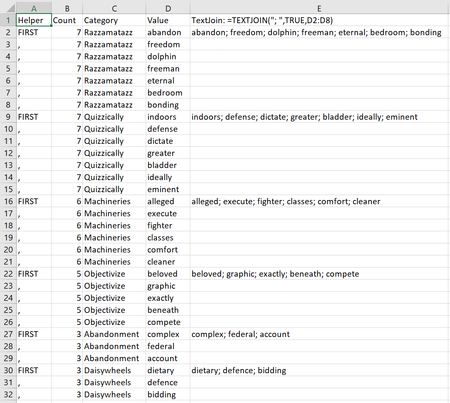
Using a value to set the ending row for a TextJoin formula
I'd appreciate some advice on how to use the information in the 'count' or 'helper' columns (in the image below) to automatically set the end row of the textjoin formula so that I can create the info...
- Mar 20, 2024
In E2:
=IF(C2=C1,"",TEXTJOIN("; ",TRUE,FILTER($D$2:$D$1000000,$C$2:$C$1000000=C2)))
or
=IF(A2="FIRST", TEXTJOIN("; ", TRUE, D2:INDEX(D3:D$1000000, MATCH("FIRST", A3:A$1000000, 0)-1)), "")
Fill down

HansVogelaar
Mar 20, 2024MVP
In E2:
=IF(C2=C1,"",TEXTJOIN("; ",TRUE,FILTER($D$2:$D$1000000,$C$2:$C$1000000=C2)))
or
=IF(A2="FIRST", TEXTJOIN("; ", TRUE, D2:INDEX(D3:D$1000000, MATCH("FIRST", A3:A$1000000, 0)-1)), "")
Fill down