Forum Discussion

staspe2475
Aug 28, 2024Copper Contributor
Use VBA to Auto create a hyperlink in multiple cells for a column
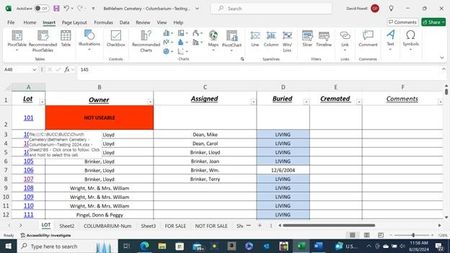
what I have: I have a workbook that has to 2 sheets. (Sheet1 and Sheet2). Sheet1(ColumnA) has the column i need to hyperlink to cells(ColumnB) on sheet2. What i need : create a routine that wi...
- Aug 29, 2024
staspe2475 If you can afford an extra column, this is easily solved using the HYPERLINK function:
=HYPERLINK("#'Sheet2'!"&CELL("address",B5),"link")

JKPieterse
Aug 29, 2024Silver Contributor
staspe2475 If you can afford an extra column, this is easily solved using the HYPERLINK function:
=HYPERLINK("#'Sheet2'!"&CELL("address",B5),"link") staspe2475Aug 29, 2024Copper ContributorIt would be ok but, I need the "LOT" (ColumnA) to increment also..if i dragged the formula down.
Thanks for the reply..!!