Forum Discussion

itsMonty
Jun 23, 2025Brass Contributor
Use IF formula with 3 conditions based off of 2 cells
Good day all. I am trying to write an IF function that looks into Cell A2, which has Dates, and returns "PD" if is less than Today() or "TC" if it is greater than Today() in Col C. However if in Cel...
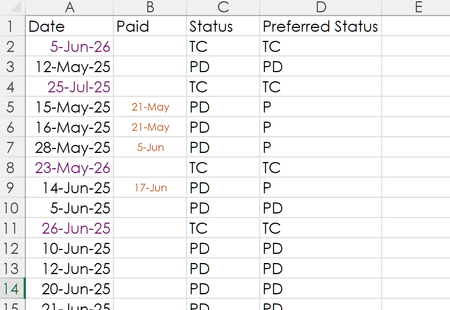
- Jun 23, 2025
As a variation, you could try
=IFS(B2<>"","P",A2<TODAY(),"PD",A2>TODAY(),"TC")
See this reference for an explanation of the IFS function, which is far better for a situation where there are multiple possible conditions. The key to sequencing it, however, is that Excel will stop evaluating conditions with the first one that it meets. That's why I put first the reference to B2 being not blank.


SergeiBaklan
Jun 24, 2025Diamond Contributor
That could be also
=LOOKUP(TODAY()-A2-B2, {-99000,-10000,0}, {"P","TC","PD"} )or
=SWITCH(
  TRUE(),
  $B2<>"", "P",
  $A2 > TODAY(), "TC",
 "PD")
itsMonty
Jul 07, 2025Brass Contributor
This worked brilliantly. I just don't understand it. I am assuming 99000 and 10000 are equivalent to Greater and Lesser than?
Either way it works perfectly. Thank you so kindly
cheers