Forum Discussion

Use IF formula with 3 conditions based off of 2 cells
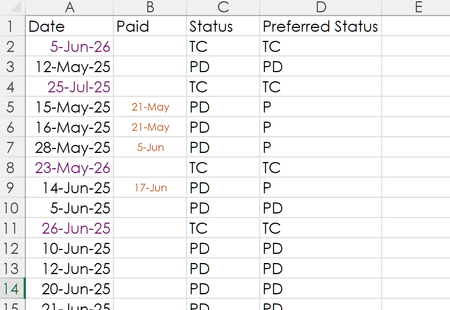
- Jun 23, 2025
As a variation, you could try
=IFS(B2<>"","P",A2<TODAY(),"PD",A2>TODAY(),"TC")
See this reference for an explanation of the IFS function, which is far better for a situation where there are multiple possible conditions. The key to sequencing it, however, is that Excel will stop evaluating conditions with the first one that it meets. That's why I put first the reference to B2 being not blank.

As a variation, you could try
=IFS(B2<>"","P",A2<TODAY(),"PD",A2>TODAY(),"TC")
See this reference for an explanation of the IFS function, which is far better for a situation where there are multiple possible conditions. The key to sequencing it, however, is that Excel will stop evaluating conditions with the first one that it meets. That's why I put first the reference to B2 being not blank.

Thanks so much, this works perfectly.
Cheers