Forum Discussion

cmanning319
Oct 16, 2024Copper Contributor
Use Conditional Formatting to Highlight Cell Past the Date
Hello! I have a spreadsheet with task assignments for my team. It is a table. Column A is the name of the person assigned, header is Marketing Advisor. Column B is the date they were assigned, colu...
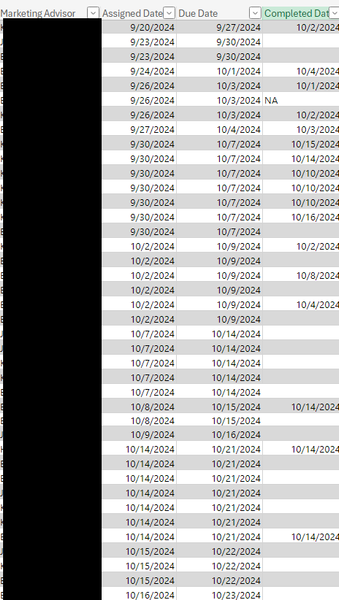
- Oct 16, 2024
Select from C2 to the last cell in the table in column C. C2 should be the active cell in the selection.
On the Home tab of the ribbon, click Conditional Formatting > New Rule...
Select 'Use a formula to determine which cells to format'.
Enter the formula=AND($C2<TODAY(), $D2="")
Click Format...
Activate the Fill tab.
Select red as fill color.
Click OK, then click OK again.

HansVogelaar
Oct 16, 2024MVP
Select from C2 to the last cell in the table in column C. C2 should be the active cell in the selection.
On the Home tab of the ribbon, click Conditional Formatting > New Rule...
Select 'Use a formula to determine which cells to format'.
Enter the formula
=AND($C2<TODAY(), $D2="")
Click Format...
Activate the Fill tab.
Select red as fill color.
Click OK, then click OK again.

cmanning319
Oct 16, 2024Copper Contributor
Thank you so much! That did the trick!