Forum Discussion

rschauer620
Jul 11, 2022Copper Contributor
Use Autofill for multiple values in a cell
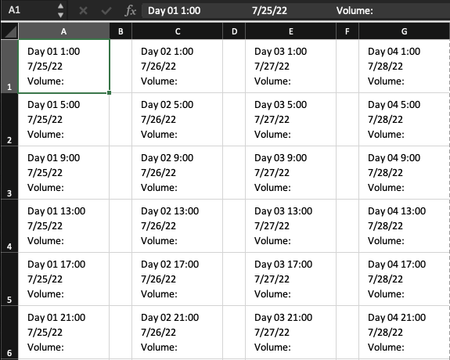
I am printing out labels where each column is a different day # and date and each row is a different timestamp. I'm making these for about 45 days and was wondering if there is an easy way to use th...
 Jul 11, 2022
=IF(MOD(COLUMN(A:A),2)=1,CONCATENATE(A$8," ",TEXT($J1,"h:mm"),CHAR(10),TEXT(A$9,"M/TT/jjjj"),CHAR(10),"volume:"),"")Maybe with this formula. You can enter the relevant data in rows 8 and 9 and in column J. I've entered the formula in cell A1 and copied across range A1:G6.
OliverScheurich
Jul 11, 2022Gold Contributor
=IF(MOD(COLUMN(A:A),2)=1,CONCATENATE(A$8," ",TEXT($J1,"h:mm"),CHAR(10),TEXT(A$9,"M/TT/jjjj"),CHAR(10),"volume:"),"")
Maybe with this formula. You can enter the relevant data in rows 8 and 9 and in column J. I've entered the formula in cell A1 and copied across range A1:G6.
rschauer620
Jul 15, 2022Copper Contributor
OliverScheurich Aha that's perfect, thank you!