Forum Discussion

Unlocking Worksheet Protection
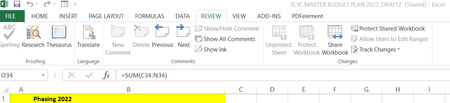
- Nov 02, 2021
The following steps could help:
Open Excel and click the Review tab and Unshare.
Then repeat the whole thing for the workbook via "Check" and "Approve workbook".
In the window you now have to remove the check mark next to "Allow editing by several users at the same time" and apply the changes with "OK".
Confirm the acceptance of the changes again with "Yes" and "Next" and the button should no longer be grayed out.
The individual tabs "Grouped" could possibly also be. And then one table probably doesn't know what the other wants. Mark all tabs and ungroup if the first steps did not help.
Hope I was able to help you with this info.
Nikolino
I know I don't know anything (Socrates)

The following steps could help:
Open Excel and click the Review tab and Unshare.
Then repeat the whole thing for the workbook via "Check" and "Approve workbook".
In the window you now have to remove the check mark next to "Allow editing by several users at the same time" and apply the changes with "OK".
Confirm the acceptance of the changes again with "Yes" and "Next" and the button should no longer be grayed out.
The individual tabs "Grouped" could possibly also be. And then one table probably doesn't know what the other wants. Mark all tabs and ungroup if the first steps did not help.
Hope I was able to help you with this info.
Nikolino
I know I don't know anything (Socrates)

Hi NikolinoDE
Thanks a lot for getting back to me so quickly and apologies for my tardy response time but I have to say your input has answered all my questions. You don't know how frustrated I was getting with this but everything is now resolved so a huge thank you!
Mike
- NikolinoDENov 05, 2021Platinum ContributorI am pleased that I was able to help you to find the solution.
I also wish you a lot of fun with Excel.