Forum Discussion

Unexpected Pivot Table Header Changes by itself

Not the word browse in my text but the word browse in text below this editor.
Which says:
Drag and drop here or browse files to attach

Here is what I see. I could be completely blind but I don't see what you are refering to.
- GordH42Apr 25, 2022Copper ContributorThanks for the options. I have not tried your suggestions. I think I will just stick with making sure that only the data area is highlighted for the pivot table and no thighlight the columns.
Thanks to all. - SergeiBaklanApr 22, 2022Diamond Contributor
I see, thank you. Now I can reproduce. So, the problem if only you select entire columns. Don't know what is exact reason, something is wrong in calculation chain. Workarounds could be
1) Refresh PivotTable after creating, with data change and on file opening.
2) Creating PivotTable add data to data model
3) In source data change Resequence formula on
=COUNTIFS($B$2:$B2, B2, $C$2:$C2, C2 )4) Or change that formula on
=IF(B2&C2<>B1&C1,1,1+E1)5) Convert source data to structured table and build PivotTable on it
With any of above it (or combination of them) works, at least in my case.
- GordH42Apr 21, 2022Copper Contributor
SergeiBaklan Hi. I have uploaded a video buried in a powerpoint showing the two highlighting options and the differeing results. One where I highlight the entire columns and secondly, where I only highlight the data area. Plus I have added the excel file with these results in dropbox links below.
https://www.dropbox.com/scl/fi/s8vm9fddjvnrohibnmsf5/Reproducible-Pivot-differences.pptx?dl=0&rlkey=j8o0z4pyda81g86mz3n797ym0
https://www.dropbox.com/scl/fi/xon12pt3u01fxglj0qi34/Weird-pivot-table-result-5.xlsx?dl=0&rlkey=dhvj264jne0ba5g7a6lqjo0pa
- SergeiBaklanApr 21, 2022Diamond Contributor
- GordH42Apr 20, 2022Copper ContributorTo answer your question. No did not change the data manually. If you look at my latest version uploaded in dropbox, the headings are now correct but also the data in now in a different spot. I would have had to change both the headings and the data manual to get to this weird result. And no point in that. But have to ask.
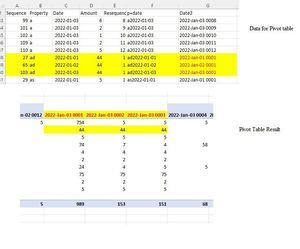
- GordH42Apr 20, 2022Copper ContributorI figure it out or at least partially. When I highlighted the FULL columns (not just the raw data area but all the blank rows) for the pivot area, it comes up with this error. When I highlighted only the data area for the pivot table, it is ok. It's reproducible.
Table Range: $A:$G gives this odd error.
Table Range: $A$1:$G$115 gives the right answer.
Thank you all and especially Detlef for all the help. Sorry for the newbie error.
https://www.dropbox.com/scl/fi/9caowtiad1lw1pskeqtng/Weird-pivot-table-result-3.xlsx?dl=0&rlkey=wjdnjf99ohc37ay9c23xjqsqp - SergeiBaklanApr 20, 2022Diamond Contributor
Just refreshed and it works. Did you change PivotTable manually?
By the way, on each Excel version/platform you are?
- GordH42Apr 20, 2022Copper ContributorPosted a dropbox link. Hopefully that works.
- GordH42Apr 20, 2022Copper Contributor
HansVogelaar ok let's see if this works.
https://www.dropbox.com/scl/fi/wr2dzwv30pxs62dc2ti2x/Weird-pivot-table-result.xlsx?dl=0&rlkey=j0jsu0ucbenthr9g2tq9cv7io
- HansVogelaarApr 20, 2022MVP
Upload the workbook to a cloud service such as OneDrive, Google Drive, Dropbox or similar.
Obtain a link to the uploaded file and post that link in a reply.
- GordH42Apr 20, 2022Copper Contributorsame problem with microsoft edge. No upload button.
- GordH42Apr 20, 2022Copper ContributorAlso changed browser from firebox to chrome. No difference. Will try microsoft edge next.
- GordH42Apr 20, 2022Copper ContributorOk that is going a little beyond my skills. It will take a bit. But what is strange is I can drag and drop jpegs but nothing else. Tried changing the extension from .xlsx to .jpeg just to fool it but it is too smart. Tried saving in .zip but it doesn't like it. It only seems to like .jpeg. safest. I'll have to figure out how to unblock domains. Appreciate your help.
- Detlef_LewinApr 20, 2022Silver Contributor
Strange.
Do you use a browser add-in which blocks domains?
If so then try and unblock these domains:
techcommunity.microsoft.com
wcpstatic.microsoft.com
ajax.aspnetcdn.com
clarity.ms
az416426.vo.msecnd.net

