Forum Discussion

AkaForrest
Nov 18, 2021Copper Contributor
Unbind keybind for displaying ribbon shortcuts.
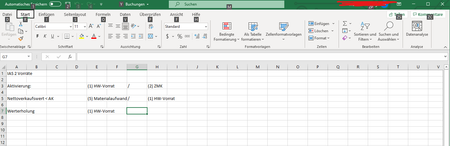
When pressing Shift+7 or / on my keypad in order to type / (as seen in the above row) my Excel displays the ribbon shortcuts. (Like using Alt.) If i press it again it wont disappear. How can i unbind...
- Nov 18, 2021
Select File > Options.
Select Advanced in the navigation pane on the left.
Scroll all the way down.
Under "Lotus compatibility", clear the box "Microsoft Excel menu key".
Click OK.

HansVogelaar
Nov 18, 2021MVP
Select File > Options.
Select Advanced in the navigation pane on the left.
Scroll all the way down.
Under "Lotus compatibility", clear the box "Microsoft Excel menu key".
Click OK.
 AkaForrestNov 19, 2021Copper ContributorIssue solved!
Thank you very much for your help, no idea how it got changed in the first place.