Forum Discussion

ayubkhanec
Aug 16, 2024Copper Contributor
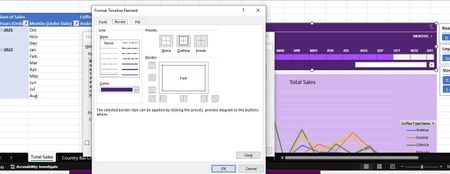
Unable to select line style and borders in timeline in excel
Hi, I'm facinng a strange issue. I've created a timeline for a dataset and its working fine. However, while I'm trying to edit the timeline style, it doesn't allow me to choose the border of ...

vikram_v19
May 26, 2025Copper Contributor
You're seeing grayed-out options for timeline formatting (like borders, line styles, and underline) likely due to one of these reasons:
- Built-in Limitations: Excel timelines have limited formatting—only basic presets like "None" and "Outline" are available for some elements.
- Office Timeline Add-in: If you're using this in PowerPoint, copying timelines incorrectly (not as full slides) can disable editing options.
- Edit Mode: In Excel, formatting options are disabled while editing a cell. Press Enter or click outside the cell to enable them.
- Protected Sheet/Workbook: If the file is protected, many formatting features are restricted. Unprotect it via the Review tab.
- Platform Limitations: Some features are only available in the desktop version of Excel or Power BI.
Vikram
Aps4Rent