Forum Discussion

UK Date format
I am new here and will appreciate some help with Excel Online
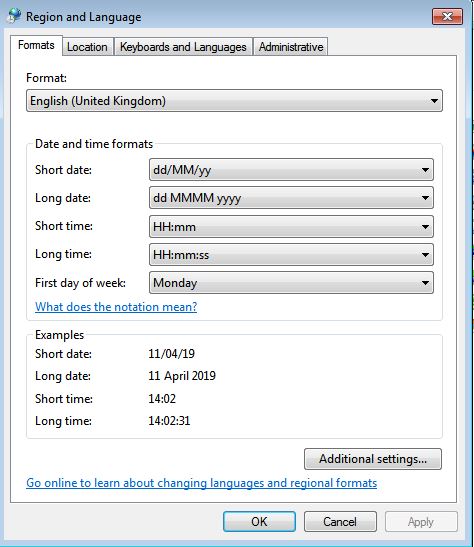
I wish to format my dates in a single column as dd/mm/yy for UK format. My Control Panel options are set to locale of English (United Kingdom).
Ideally I would like to be able to type 11/04 into a cell which should appear as 11/04/19 but it instead appears as 04/11/19 despite the format being set correctly. This is obviously frustrating.
Looking at the attached screenshot, the first few dates in the column are set to text format because I was experimenting. The next few are formatted as short date UK.
Thank you!
9 Replies
- SergeiBaklanDiamond Contributor
Michael188 , yes, as Jan Karel answered you shall to define UK locale for your OneDrive, not for PC. Settings are different depends on you use OneDrive Personal or Business one.
 helen42Copper Contributor
Hi Sergei
In my hunt for an answer re an almost identical issue, I have seen your name pop up several times providing a successful solution, but i still can't get this to work.My issue:
- I have an office 365 business subscription. I normally open the spreadsheet on my desktop and all is well (UK date format works perfectly). However, if I (or four other UK users) access it online:
- Date format appears:
- correctly (as UK date format) in cell
- incorrectly (as US date format) in Formula Bar
- Typing:
- 1/2 in a cell (i.e. 1st Feb UK), generates 2/1 in the cell (i.e. 2nd Jan UK).
- 31/10 in a cell is not recognised as a date
- Date format appears:
So far:
- I've set to English (UK)/(UTC+00:00) Dublin, Edinburgh, Lisbon where possible:
- Control Panel, Region
- One Drive, Regional Settings
- Microsoft 365 admin center, settings
- Excel - Cell Number Format
- I've also tried using custom dates in Excel desktop to no avail
Do you have any other suggestions?
Cheers
Helen- JKPieterseSilver ContributorWhat is your browser set to?
- I have an office 365 business subscription. I normally open the spreadsheet on my desktop and all is well (UK date format works perfectly). However, if I (or four other UK users) access it online:
 Michael188Copper Contributor
Thank you. I have asked my internal IT support to update that option within OneDrive (which is currently not a valid locale) and I will respond back later when it has been done.