Forum Discussion

Michael188
Apr 11, 2019Copper Contributor
UK Date format
I am new here and will appreciate some help with Excel Online I wish to format my dates in a single column as dd/mm/yy for UK format. My Control Panel options are set to locale of English (United Ki...

helen42
Nov 18, 2019Copper Contributor
Hi Sergei
In my hunt for an answer re an almost identical issue, I have seen your name pop up several times providing a successful solution, but i still can't get this to work.
My issue:
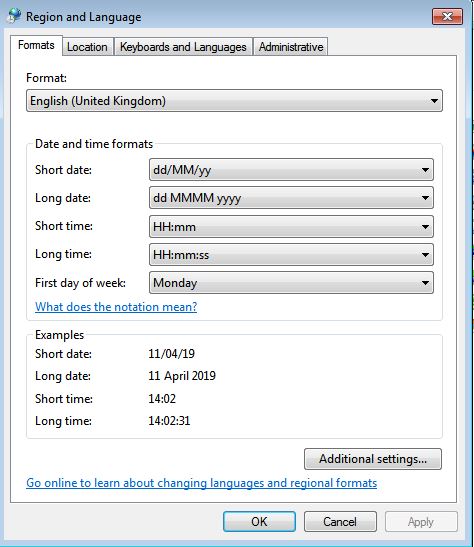
- I have an office 365 business subscription. I normally open the spreadsheet on my desktop and all is well (UK date format works perfectly). However, if I (or four other UK users) access it online:
- Date format appears:
- correctly (as UK date format) in cell
- incorrectly (as US date format) in Formula Bar
- Typing:
- 1/2 in a cell (i.e. 1st Feb UK), generates 2/1 in the cell (i.e. 2nd Jan UK).
- 31/10 in a cell is not recognised as a date
- Date format appears:
So far:
- I've set to English (UK)/(UTC+00:00) Dublin, Edinburgh, Lisbon where possible:
- Control Panel, Region
- One Drive, Regional Settings
- Microsoft 365 admin center, settings
- Excel - Cell Number Format
- I've also tried using custom dates in Excel desktop to no avail
Do you have any other suggestions?
Cheers
Helen

JKPieterse
Nov 18, 2019Silver Contributor
What is your browser set to?
- helen42Nov 18, 2019Copper Contributor
- SergeiBaklanNov 18, 2019Diamond Contributor
And the same is for OneDrive setting?
Time zone is not critical from this point of view.
Here is what I have with above OneDrive for Business settings
and two digits date 2/1
IMHO, itself browser settings and client Windows settings shall not affect.
- helen42Nov 19, 2019Copper Contributor
Yip, ONEDRIVE:
I've also set Sharepoint and MS Teams to UK.
EXCEL ONLINE 😞EXCEL DESKTOP 🙂