Forum Discussion

Trying to search for multiple criteria and return multiple results
- Jun 08, 2025
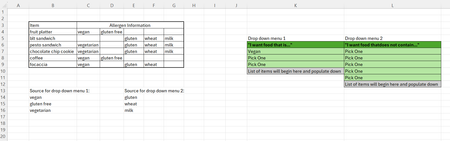
FILTER is the way to go and to make FILTER do multiple criteria use (crit1)*(crit2) to AND then or (crit1)+(crit2) to OR them. Also the criteria should be a single row or column not a range. So
=FILTER(B4:G9,(C4:C9=K7)*(C4:C9=K8)*(D4:D9=K9),"none")
to have Veggie include Vegan you will have to add more logic but the easier way (IMHO) would be to remove the drop downs and make them checkboxes instead. i.e. J7 would say Vegetarian and K7 would have the checkbox and rows 8 and 9 would have Vegan and Gluten-Free. Then you can use:
=FILTER(B4:G9,IF(K7,(C4:C9=J7)+(C4:C9=J8),1)*IF(K8,(C4:C9=J8),1)*IF(K9,(D4:D9=J9),1),"none")
adding image of checkbox idea and attaching file:

FILTER is the way to go and to make FILTER do multiple criteria use (crit1)*(crit2) to AND then or (crit1)+(crit2) to OR them. Also the criteria should be a single row or column not a range. So
=FILTER(B4:G9,(C4:C9=K7)*(C4:C9=K8)*(D4:D9=K9),"none")
to have Veggie include Vegan you will have to add more logic but the easier way (IMHO) would be to remove the drop downs and make them checkboxes instead. i.e. J7 would say Vegetarian and K7 would have the checkbox and rows 8 and 9 would have Vegan and Gluten-Free. Then you can use:
=FILTER(B4:G9,IF(K7,(C4:C9=J7)+(C4:C9=J8),1)*IF(K8,(C4:C9=J8),1)*IF(K9,(D4:D9=J9),1),"none")
adding image of checkbox idea and attaching file: