Forum Discussion

Trim Range Operator not working in Range Reference for Pivot Table
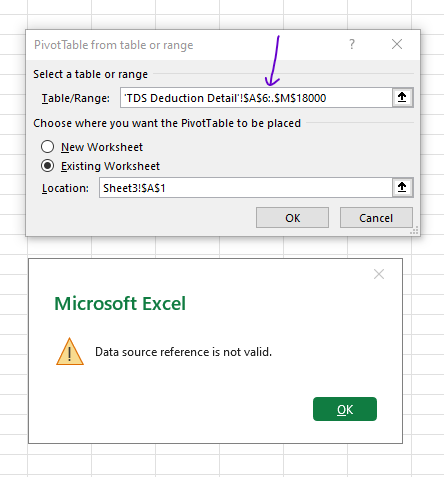

I am using
Microsoft 365 Family
Microsoft® Excel® for Microsoft 365 MSO (Version 2507 Build 16.0.19009.20000) 64-bit
Windows 10 Version 22H2 (OS Build 19045.5965)

Yes, it doesn't work if you are staying in empty Sheet3 start with Insert->PivotTable->add table range on another sheet->Ok
However, if you stay at any cell within TDS Seduction Detail sheet, Insert->PivotTable->add table range->choose where to place PivotTable: Existing worksheet, select cell in Sheet3->Ok when it works.
Alternatively you may create PivotTable directly within TDS Deduction Detail sheet and after that move on to desired place in another sheet.
Please note, as Patrick2788 mentioned range won't be dynamic. It'll be trancated into static range by applied trimming during creation of PivotTable. Aftre that the only way to change source range is to use PivotTable Analysis -> Change Data Source. Thus trimming give nothing.
You are on Beta channel with Family subscription, I believe data model shall be available for it. But I don't see option "Add to data model" on your screenshot, have no idea why. With it source range could be really dynamic since blank rows at the end are cut with that option.
- KanwalNo1Jun 15, 2025Iron Contributor
Thanks Sir!
You are right! It works that way. It is not dynamic, i.e., it is trancated into static range of the original length, if I check it through "Change Data Source" option. Data Model is available in my version but not sure how to use. Also if it is not selected at the time of creation of Pivot table, I am not sure whether it can be opted for later or not, and how to do that if we want to opt the data model. Quite interested to know that!
Instead I created a named range using offset and used that range in pivot table source and it works.