Forum Discussion

KanwalNo1
Jun 14, 2025Iron Contributor
Trim Range Operator not working in Range Reference for Pivot Table
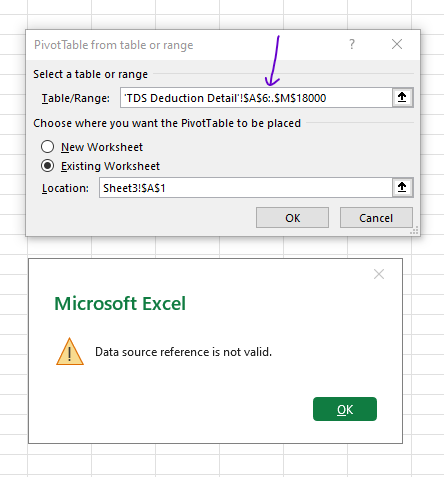
I am getting an error message when I try to use Trim Range Operator does not work. Not sure why? Not sure if there is any resolution or bypass to this?

Patrick2788
Jun 14, 2025Silver Contributor
It works in my version of Excel but the reference will revert to a static range (e.g. Sheet1!$A:.$B becomes Sheet1!$A$1:$B$16). The only convenience is blanks aren't pivoted initially but that can be avoided by specifying the range or using a table.

SergeiBaklan
Jun 14, 2025Diamond Contributor
On Excel desktop it's better to add data to data model creating PivotTable. Extra blank rows at the end will be cut automatically and source range won't be changed.