Forum Discussion

Transfer of Data to Different sheet
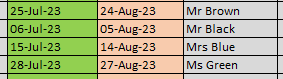

Thank you for the above, how would i combat the issue around multiple names at the same date? which will certainly occur.

Hi Zack05,
if you use Excel from Microsoft 365, you can use a combination of FILTER and COOSECOLS function.
Example formula in L3:
=IFERROR(CHOOSECOLS(FILTER(Script_Tracker!$A$2:$C$5,Script_Tracker!$B$2:$B$5=L2),3),"")
The FILTER part of the formula just gets the three columns A, B and C (Prep Date, Next Prep Date, Name) if the Next Prepdate ($B$2:$B$5 in my Script_Tracker sheet) equals to the date in L2
-> FILTER(Script_Tracker!$A$2:$C$5;Script_Tracker!$B$2:$B$5=L2)
As you just need the column with the Names (= Column C or column 3 in the filtered list), I use the CHOOSECOLS-function:
-> CHOOSECOLS(result of the FILTER function);3)
And to avoid errors for dates that do not have a name, I supress those errors with IFERROR
Just make sure, that you have enough lines to show all names below the date, otherwise you will get a #SPILL! error.
If you do not have Excel 365, unfortunately I do not have a proper solution for you.
Kind regards,
Martin