Forum Discussion

Luwana1
Feb 09, 2024Copper Contributor
too many decimals places returned with concat from field with only two decimals
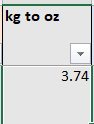
Hello! I'm learning more complicated excel through here and really appreciate all of your expert help. I haven't been able to find the answer to this... I've tried fixed and trunk, and they return wi...
- Feb 09, 2024
Use the TEXT function:
=CONCAT([@[Approx Dimentions]],CHAR(10),"Approx Wt (oz): ",TEXT([@[kg to oz]], "0.00"),CHAR(10),CHAR(10),[@description],CHAR(10),CHAR(10),[@Origin])
or
=[@[Approx Dimentions]]&CHAR(10)&"Approx Wt (oz): "&TEXT([@[kg to oz]], "0.00")&CHAR(10)&CHAR(10)&[@description]&CHAR(10)&CHAR(10)&[@Origin]

HansVogelaar
Feb 09, 2024MVP
Use the TEXT function:
=CONCAT([@[Approx Dimentions]],CHAR(10),"Approx Wt (oz): ",TEXT([@[kg to oz]], "0.00"),CHAR(10),CHAR(10),[@description],CHAR(10),CHAR(10),[@Origin])
or
=[@[Approx Dimentions]]&CHAR(10)&"Approx Wt (oz): "&TEXT([@[kg to oz]], "0.00")&CHAR(10)&CHAR(10)&[@description]&CHAR(10)&CHAR(10)&[@Origin]

Luwana1
Feb 14, 2024Copper Contributor
Thank you! The first one worked perfectly! thank you so much!