Forum Discussion

Timesheet Help - Adding potential unpaid break
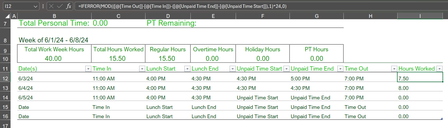

Try this:
=MOD([@[Time Out]]-[@[Time In]]-[@[Unpaid Time end]]+[@[Unpaid Time Start]],1)*24Leave the unpaid start and end blank if not applicable and custom format column I as General.
If you explicitly want to show that you didn't take a break enter zeroes, but don't leave the text "Unpaid Time ...." in columns F:G. A text will cause a #VALUE! error that IFERROR replaced with a 0 in your formula.
 AmandaLPaullJun 03, 2024Copper Contributor
Riny_van_Eekelen, I'm grateful for your response! It looks like that formula isn't much different than my current formula. My original formula also would've worked if I kept the columns under Unpaid Time Start and Unpaid Time End blank. I was hoping there would be a way to keep the text in there, but if not, I'll delete it.
I greatly appreciate your time.

 SnowMan55Jun 04, 2024Bronze Contributor
AmandaLPaull There is an alternative. With the proper custom number format, you can have the display of a number replaced by the display of specific text. See the attached workbook.