Forum Discussion

catherine9910
Jan 26, 2022Brass Contributor
Time-Lapse Help
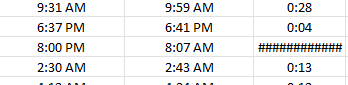
Hello, I am trying to do a time-lapse formula and I get ###### that goes on forever (example below). How do I fix this (the employees don't know or use 24-hour times).

bosinander
Jan 26, 2022Steel Contributor
As suggested by Riny_van_Eekelen, MOD() with 1 as divisor will give you the time part of an elapsed period.
Multiply with 24 and you get the number of hours, being the same result but visualized with decimals instead of minutes. 54 minutes = 0,9 hours.
When you sum time you may pass full days and still want to view as hours.
Showing decimals does that and D3 is formated as h within brackets [h].mm to keep counting hours instead of showing like 2 days and 54 minutes.

catherine9910
Jan 26, 2022Brass Contributor
bosinander when I type in =MOD(B5-A5;1) I get the error message. How are you able to do you that without the error?
- SergeiBaklanJan 26, 2022Diamond Contributor
Perhaps in your locale it'll be
=MOD(B5-A5,1)It's better to copy formulae from file, not from post.
