Forum Discussion

Time format used to work, but not anymore in Excel
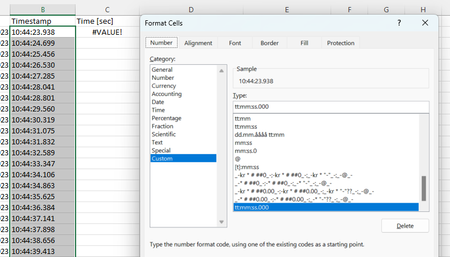
- May 22, 2023
Deleted
Thanks. What happens if you do the following?
- Select column B.
- On the Data tab of the ribbon, click Text to Columns.
- Select Delimited, then click Finish.
This worked for me - the values are now right-aligned:
Workbook attached.

Deleted
Very strange! Could you attach a small sample workbook demonstrating the problem (without sensitive data), or if that is not possible, make it available through OneDrive, Google Drive, Dropbox or similar?
- HansVogelaarMay 22, 2023MVP
Deleted
Thanks. What happens if you do the following?
- Select column B.
- On the Data tab of the ribbon, click Text to Columns.
- Select Delimited, then click Finish.
This worked for me - the values are now right-aligned:
Workbook attached.
- DeletedMay 22, 2023Not applicable
Hello and thanks for answer!
This is very weird.. I tried your method, but nothing happens.
When i downloaded your corrected "Help with timestamp" execl file, i can do calculations, as seen in picture below:
I tried copy and paste all my timestamps into your corrected file, but that did not work either..
I can try to delete and reinstall Excel, if you dont have any other options?
again, thanks for reply 🙂
- HansVogelaarMay 22, 2023MVP
Deleted
Has anything changed in your regional settings in Windows?
Reinstalling Office may not be necessary, there should be a repair option:
- Select Start > Settings.
- Select Apps.
- Scroll down the list of apps and select your version of Office.
- Click the ... button on the right hand side and select Modify.