Forum Discussion

Tu_Nguyen115
Feb 02, 2024Copper Contributor
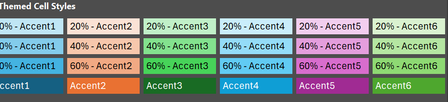
Themed Cell Style option changes to new palette.
My themed cell style in Excel table suddenly changes to a completely different color palette. How could I restore the beautiful palette of themed cell style? Thank you very much. My current themed ...

flexyourdata
Feb 02, 2024Iron Contributor
To revert to the previous theme, go to Page Layout > Themes and select 'Office 2013 - 2022 Theme' from the available themes. In my instance of Excel, the second theme reverts to the colors you prefer.
 Tu_Nguyen115Feb 02, 2024Copper Contributor
flexyourdata Thank you very muchhhhh, I reverted to the previous theme successfully.
 ech70551Oct 02, 2024Copper Contributor
thanks for this hint.
any idea how to change this as a default, so we don't need to change this back for every newly created spreadsheet? (I didn't find a setting in the Excel Options)