Forum Discussion

Forrest_Graves
Jul 24, 2020Copper Contributor
Text to Columns
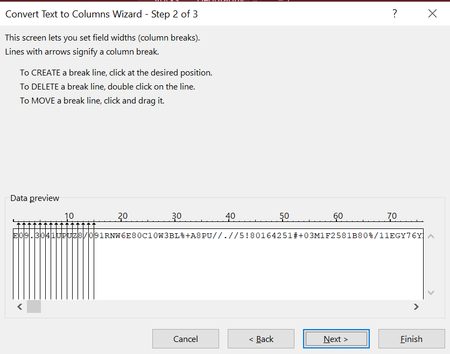
When converting "Text to Columns" using "Fixed Width" is there a way to automatically insert "Column Breaks" in between each character instead of having to do it manually? I have attached a pic ...


JMB17
Jul 24, 2020Bronze Contributor
You would probably need a macro for that. Make a backup of your data, then select your text and try this macro.
Sub Macro1()
     Dim fldInfo As Variant
     Dim cell As Range
     Dim maxLen As Long
     Dim i As Long

     For Each cell In Selection.Cells
          maxLen = Application.Max(maxLen, Len(cell.Value))
     Next cell

     ReDim fldInfo(0 To maxLen - 1)

     For i = 0 To maxLen - 1
          fldInfo(i) = Array(i, 1)
     Next i

     Selection.TextToColumns _
          Destination:=Selection.Cells(1), _
          DataType:=xlFixedWidth, _
          FieldInfo:=fldInfo, _
          TrailingMinusNumbers:=True

     Set cell = Nothing

End Sub
Forrest_Graves
Jul 27, 2020Copper Contributor