Forum Discussion

Text to Column

I created a small dataset that contains the full names of the U.S. states in column A, and their corresponding USPS state postal codes in column B. I sourced these values from Wikipedia’s list of U.S. states and abbreviations.
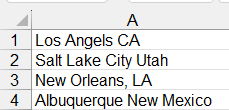
In column D, I inserted your data, which contains combined “City + State” strings. These entries include either the full state name or the state postal code.
To split each entry into two separate columns, one for the city and one for the state, I used the following formula in cell F1:
=LET(
  us_state, A2:B51,
city_state, D2:D5,
        lm, LAMBDA(a,b, SUBSTITUTE(a, b, "")),
        rd, REDUCE(city_state, us_state, lm),
            VSTACK({"City","State"},
                   SUBSTITUTE(HSTACK(rd, REDUCE(city_state, rd, lm)), ",", ""))
)
This formula works by first removing all state names and postal codes from the original “City + State” strings, leaving only the city names. Then it separates the state part by subtracting the extracted city from the original text. Finally, it stacks everything into a two‑column output labeled City and State.
Hope this helps,
IlirU