Forum Discussion

Take 2 on concatenating a group of related cells across several rows into one cell

=LET(rng,A2:E14,PCODE_BUNDLEID,UNIQUE(FILTER(CHOOSECOLS(rng,1,2),CHOOSECOLS(rng,2)<>"")),IFNA(REDUCE({"PCODE"."BUNDLEID"."COMPONENTS + QUANTITIES"."Other Stuff"},SEQUENCE(ROWS(PCODE_BUNDLEID)),LAMBDA(u,v,VSTACK(u,
HSTACK(INDEX(PCODE_BUNDLEID,v,1),"","",FILTER(CHOOSECOLS(rng,5),(CHOOSECOLS(rng,1)=INDEX(PCODE_BUNDLEID,v,1))*(ISBLANK(CHOOSECOLS(rng,2))))),
HSTACK(INDEX(PCODE_BUNDLEID,v,{1.2}), TEXTJOIN({"-".","},,FILTER(CHOOSECOLS(rng,3,4),(CHOOSECOLS(rng,1)&CHOOSECOLS(rng,2)=INDEX(PCODE_BUNDLEID,v,1)&INDEX(PCODE_BUNDLEID,v,2)))),
FILTER(CHOOSECOLS(rng,5),(CHOOSECOLS(rng,1)=INDEX(PCODE_BUNDLEID,v,1))*(CHOOSECOLS(rng,2)=INDEX(PCODE_BUNDLEID,v,2))*(ISBLANK(CHOOSECOLS(rng,3)))))))),""))
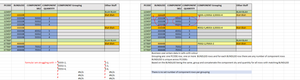
For the original requirement i've improved the formula with the help of CHOOSECOLS. Now only the range at the beginning of the formula has to be changed (for example from A2:E14 to A2:E28) and then the formula spills the result.
=LET(rng,A3:F15,z,REDUCE({"PCODE"."BUNDLEID"."COMPONENT SKU"."COMPONENT QUANTITY"."COMPONENT Grouping"."Other Stuff"},SEQUENCE(ROWS(rng)),LAMBDA(a,b,VSTACK(a,IF((INDEX(rng,b,2)<>"")*(INDEX(rng,b,3)=""),HSTACK(INDEX(rng,b,{1.2.3.4}),TEXTJOIN({"-".","},,FILTER(CHOOSECOLS(rng,3,4),CHOOSECOLS(rng,1)&CHOOSECOLS(rng,2)=INDEX(rng,b,1)&INDEX(rng,b,2))),INDEX(rng,b,6)),HSTACK(INDEX(rng,b,)))))),IF(z=0,"",z))
This is my suggestion for the new requirement. It returns the intended result in the attached file if i correctly understand what you want to do.

Thanks again Oliver for your work and quick response. I don't believe I was clear enough in the previous example spreadsheet. I need to take the component SKU and quantity from each of the component rows associated to the BUNDLEID and concatenate them in the yellow colored cell in the BUNDLEID row. No need anymore to generate a separate table.
- OliverScheurichMay 02, 2024Gold Contributor
=LET(rng,A3:D15,
BYROW(SEQUENCE(ROWS(rng)),LAMBDA(b,IF((INDEX(rng,b,3)="")*(INDEX(rng,b,2)<>""),TEXTJOIN({"-".","},,FILTER(CHOOSECOLS(rng,3,4),CHOOSECOLS(rng,1)&CHOOSECOLS(rng,2)=INDEX(rng,b,1)&INDEX(rng,b,2))),""))))
You are welcome. This formula should return the intended output. Unfortunately i didn't understand the requirement when i posted my last reply.
- NotSoFastEddieMay 05, 2024Brass ContributorHey Oliver. Got it working in my spreadsheet. Learned quite a bit from your formula. Thanks for everything.