Forum Discussion

table set up for mail merge
- May 14, 2024
Re challenge #1:
The =IF(H2<1,"Priority",IF(H2=1.1>=2.9,"CatchUp",IF(H2>3,"Refresher"))) will indeed never come to the "Refresher" stage as the second test H2=1.1>=2.9 will always evaluate as TRUE and thus return "CatchUp". Obviously your intention is to test if the value is between 1.1 and 2.9, but that's not the way to achieve it. You could use IF(AND(H2>=1.1,H2<=2.9),...... but that's unnecessary.
Change the order of the logical_tests in stead.
=IF(H2>=3,"Refresher",IF(H2>=1.1,"CatchUp","Priority"))

Re challenge #1:
The =IF(H2<1,"Priority",IF(H2=1.1>=2.9,"CatchUp",IF(H2>3,"Refresher"))) will indeed never come to the "Refresher" stage as the second test H2=1.1>=2.9 will always evaluate as TRUE and thus return "CatchUp". Obviously your intention is to test if the value is between 1.1 and 2.9, but that's not the way to achieve it. You could use IF(AND(H2>=1.1,H2<=2.9),...... but that's unnecessary.
Change the order of the logical_tests in stead.
=IF(H2>=3,"Refresher",IF(H2>=1.1,"CatchUp","Priority"))

Thank you Riny your formula for column I :
=IF(H2>=3,"Refresher",IF(H2>=1.1,"CatchUp","Priority"))
Works as I had hoped it to !!!
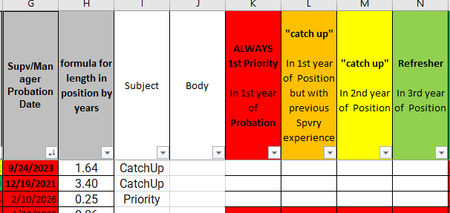
With this I was able to identify my newest supervisors still on probation in column G; I used this conditional formatting rule =G2>=TODAY() to highlight them red. As you see I have some source data issues to address.
TODAY’S REQUEST FOR YOUR ASSISTANCE IS:
The next phase of the mail merge preparation is to establish the Status and Priority Classification columns – of which i am stuck...
This is the formula I am starting with but I don’t know how to “connect” the G2 date condition correctly. =IF(I2=Highest,AND(G2=DATE,“will be the appropriate statement – see below"))
Highest = ”New Supervisor still on probation”
CatchUp = ”Supervisor within your first and second years of experience”
Refresher = ”Seasoned Supervisor with three or more years experience"
Can you help me fix/establish the formulas Please, so that i can then continue building the Mail Merge portion?
here is are two screen shot to help you visualize this challenge:
Thank you in advance for even offering to help me.
v/r,
dave
- Riny_van_EekelenMay 21, 2024Platinum Contributor
DAWJr Please see attached file for some examples using nested IFs of IF and SWITCH. Choose which suits you best.
- DAWJrMay 22, 2024Copper Contributor
Thank you Riny_van_Eekelen ... I TRULY appreciate your assistance!!!