Forum Discussion

table of contents
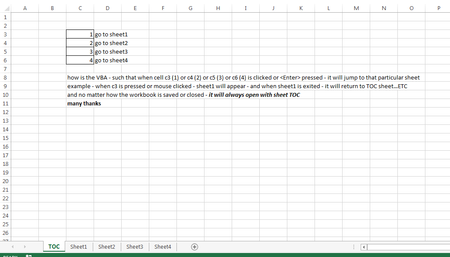
- Apr 03, 2018
Lorenzo you don't need VBA to do what you require.
Simply Right Click in Cell C3 > Link > Insert Link > Place In This Document > Select the sheet you want to navigate to.
If you want VBA this will do the trick.... put this code in the TOC code Module:
Private Sub Worksheet_SelectionChange(ByVal Target As Range)

    Select Case Target.Address
        Case "$C$3": Sheets("Sheet1").Activate
        Case "$C$4": Sheets("Sheet2").Activate
        Case "$C$5": Sheets("Sheet3").Activate
        Case "$C$6": Sheets("Sheet4").Activate
    End Select

End Sub

Lorenzo you don't need VBA to do what you require.
Simply Right Click in Cell C3 > Link > Insert Link > Place In This Document > Select the sheet you want to navigate to.
If you want VBA this will do the trick.... put this code in the TOC code Module:
Private Sub Worksheet_SelectionChange(ByVal Target As Range)

    Select Case Target.Address
        Case "$C$3": Sheets("Sheet1").Activate
        Case "$C$4": Sheets("Sheet2").Activate
        Case "$C$5": Sheets("Sheet3").Activate
        Case "$C$6": Sheets("Sheet4").Activate
    End Select

End Sub
- Lorenzo KimApr 03, 2018Bronze Contributor
Mr Matt Mickle
Thank you for your quick reply
the vba worked nicely - but can you please insert this:
when I press X at the upper right corner of the sheet - it will not close the workbook but will return to the first sheet (TOC) and in that TOC sheet is the control for exiting (closing) the file (say on cell c9)
that is - all other sheets has no provision to close the file except to return to sheet TOC
Many thanks
- Matt MickleApr 03, 2018Bronze Contributor
Lorenzo-
Try these modifications:
TOC Worksheet Code:
Private Sub Worksheet_SelectionChange(ByVal Target As Range)

    Select Case Target.Address
        Case "$C$3": Sheets("Sheet1").Activate
        Case "$C$4": Sheets("Sheet2").Activate
        Case "$C$5": Sheets("Sheet3").Activate
        Case "$C$6": Sheets("Sheet4").Activate
        Case "$C$9": Call CloseFile
    End Select

End Sub
Workbook Code:
Private Sub Workbook_BeforeClose(Cancel As Boolean)
       Cancel = True 'Cancel Workbook Close
       Sheets("TOC").Activate
End Sub
Code Module (Insert a new code module):
Sub CloseFile() Dim Answer As String Dim MyNote As String 'Supress Save MessageBox Application.DisplayAlerts = False Application.EnableEvents = False 'Place your text here MyNote = "If you would like to save the file before closing it please click YES, otherwise click NO." 'Display MessageBox Answer = MsgBox(MyNote, vbQuestion + vbYesNoCancel, "???") If Answer = vbNo Then 'Code for No buttton press ThisWorkbook.Close False ElseIf Answer = vbYes Then 'Code for Yes button Press ThisWorkbook.Close True Else 'Code for Cancel button Press Sheets("TOC").Activate End If Application.EnableEvents = True End Sub- Lorenzo KimApr 04, 2018Bronze Contributor
Mr Matt Mickle
one small thing
I noticed that the vba makes the program close without exiting excel
how should the code be changed such that after saving or not (excluding cancel - which return to TOC) the program to exit excel?
thanks again
- Lorenzo KimApr 03, 2018Bronze Contributor
Mr Matt Mickle
wow! faster than mercury! Thank you.
work like a charm!
may I request that you put a mssg box at c9 with buttons save/don't save/cancel (return to TOC)
so that it will not right away close the workbook...
many thanks
- Matt MickleApr 03, 2018Bronze Contributor
Put this code in the workbook module:
Private Sub Workbook_BeforeClose(Cancel As Boolean)
    If Selection.Parent.Name = "TOC" And Selection.Address = "$C$9" Then
        'Exit the workbook like normal
    Else
        Cancel = True
        Sheets("TOC").Activate
    End If
End Sub
Update the TOC Code Module to this:
Private Sub Worksheet_SelectionChange(ByVal Target As Range) Select Case Target.Address Case "$C$3": Sheets("Sheet1").Activate Case "$C$4": Sheets("Sheet2").Activate Case "$C$5": Sheets("Sheet3").Activate Case "$C$6": Sheets("Sheet4").Activate Case "$C$9": ThisWorkbook.Close True 'True Saves Changes, False will close without saving End Select End Sub- Lorenzo KimApr 03, 2018Bronze Contributor
Mr Matt Mickle
if it is not too much asking
is there a way to deactivate the HELP button in a message box?
in my project - I do not need it - it's ok to leave the button there but I don't want it to function or maybe to function as return to the last opened sheet.
many thanks
