Forum Discussion

tonykaz
Mar 12, 2021Copper Contributor
Table Formatting
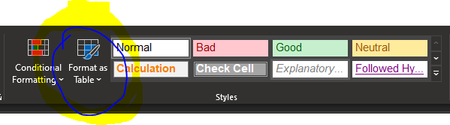
Did the built in table formatting get removed from Excel? i am looking where it used to be on the ribbon and I no longer have options to choose a table format. The only 2 options are New Ta...

tonykaz
Mar 12, 2021Copper Contributor
I have no idea what you are showing me. That has nothing to do with built in table formatting.

SergeiBaklan
Mar 13, 2021Diamond Contributor
It depends on what do you mean.
"Format as Table" icon was added in Excel 2007 to convert the range into the structured table. It is deprecated and in modern Excel for this purposes is the icon Table in the Insert tab of the ribbon. Same could be done by Ctrl+T in desktop version or Ctrl+L both in Excel Online and Excel Desktop.
If apply formatting / style to the table, that is "Table Design" tab which appears on ribbon if you stay on the cell within already created table.