Forum Discussion

deniztopcu
Sep 17, 2023Brass Contributor
sumproduct #value error
Even though I ignore null values, I get #value error. Can you help me with the cause or solution?
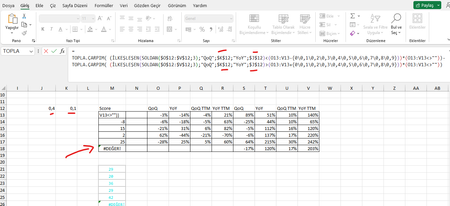

deniztopcu
Sep 17, 2023Brass Contributor
Hello, I'm getting the same error again.
This time I wrote the entire Formula.
=
TOPLA.ÇARPIM( ( İLKEŞLEŞEN(SOLDAN($O$12:$V$12;3);"QoQ";$B$4;"YoY";$A$4)<(O13:V13-{0\0,1\0,2\0,3\0,4\0,5\0,6\0,7\0,8\0,9}))*(O13:V13<>""))-
TOPLA.ÇARPIM( ( İLKEŞLEŞEN(SOLDAN($O$12:$V$12;3);"QoQ";$B$4;"YoY";$A$4)>(O13:V13+{0\0,1\0,2\0,3\0,4\0,5\0,6\0,7\0,8\0,9}))*(O13:V13<>""))

Detlef_Lewin
Sep 17, 2023Silver Contributor
Well, that is because you still have text in O18:R18. Remove it!
- deniztopcuSep 17, 2023Brass Contributor
Detlef_Lewin
I realized I made a mistake. This makes you think that this job is static.
I don't compare it to zero.
and there is actually a formula in every cell. There are structures that vary depending on the situation.- Patrick2788Sep 17, 2023Silver Contributor
You had an apostrophe in every cell in the range O18:R18.
If you step through the formula with the formula evaluator, it is made very apparent:
- deniztopcuSep 17, 2023Brass ContributorThere has to be an apostrophe there.
There is the formula under normal conditions. iferror(x-y)/y;"")
If you replace this formula with iferror((x-y)/y;0) it will be filled with "0" or "-", which is visually impossible.
