Forum Discussion

aavgoustinoss
Jan 18, 2022Copper Contributor
Summarise data and group together
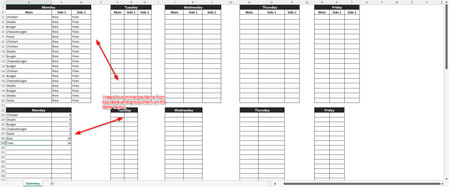
Hello! i was wondering if something like this is possible. we have a food menu for ordering. when the orders are placed on the top tables, i want then a formula or function to summarize the orders an...
- Jan 18, 2022
It's like
with
=LET(
 main,        LET(t, INDEX(dataMonday,0,1), FILTER(t,  t<>"") ),
 Side1,       LET(t, INDEX(dataMonday,0,2), FILTER(t,  t<>"") ),
 Side2,       LET(t, INDEX(dataMonday,0,3), FILTER(t,  t<>"") ),
 nA,          ROWS(main),
 nB,          ROWS(Side1),
 nC,          ROWS(Side2),
 n,           nA + nB + nC,
 j,           SEQUENCE(n),
 fullList,    IF( j <= nA, INDEX(main, j),
              IF( j<= nA+nB, INDEX(Side1, j-nA),
                  INDEX( Side2, j-nA-nB) ) ),
 names,       UNIQUE(fullList),
 countNames,  MMULT(--(names=TRANSPOSE(fullList)), SEQUENCE(n,,1,0)),
 IF({1,0}, names, countNames) )


Riny_van_Eekelen
Jan 18, 2022Platinum Contributor
aavgoustinoss You can use COUNTIF for this, and since you use MS365, you can make use of spilling dynamic array functions.
File attached.
 aavgoustinossJan 18, 2022Copper Contributorthank you, this has helped me a lot!