Forum Discussion

aavgoustinoss
Jan 18, 2022Copper Contributor
Summarise data and group together
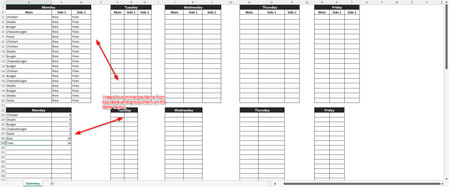
Hello! i was wondering if something like this is possible. we have a food menu for ordering. when the orders are placed on the top tables, i want then a formula or function to summarize the orders an...
- Jan 18, 2022
It's like
with
=LET(
 main,        LET(t, INDEX(dataMonday,0,1), FILTER(t,  t<>"") ),
 Side1,       LET(t, INDEX(dataMonday,0,2), FILTER(t,  t<>"") ),
 Side2,       LET(t, INDEX(dataMonday,0,3), FILTER(t,  t<>"") ),
 nA,          ROWS(main),
 nB,          ROWS(Side1),
 nC,          ROWS(Side2),
 n,           nA + nB + nC,
 j,           SEQUENCE(n),
 fullList,    IF( j <= nA, INDEX(main, j),
              IF( j<= nA+nB, INDEX(Side1, j-nA),
                  INDEX( Side2, j-nA-nB) ) ),
 names,       UNIQUE(fullList),
 countNames,  MMULT(--(names=TRANSPOSE(fullList)), SEQUENCE(n,,1,0)),
 IF({1,0}, names, countNames) )


aavgoustinoss
Jan 18, 2022Copper Contributor
please note that menu items are not fixed. many other options can be added. for example if one user adds pizza on the mains, then an automatic cell on the bottom table should be created and next to it the total, in this case 1.
- SergeiBaklanJan 18, 2022Diamond Contributor
As variant, if like this
=LET( n, ROWS(dataMonday), main, INDEX(dataMonday,0,1), Side1, INDEX(dataMonday,0,2), Side2, INDEX(dataMonday,0,3), nameMain, UNIQUE(main), countMain, MMULT(--(nameMain=TRANSPOSE(main)), SEQUENCE(n,,1,0)), nameSide1, UNIQUE(Side1), countSide1, MMULT(--(nameSide1=TRANSPOSE(Side1)), SEQUENCE(n,,1,0)), nameSide2, UNIQUE(Side2), countSide2, MMULT(--(nameSide2=TRANSPOSE(Side2)), SEQUENCE(n,,1,0)), mMain, ROWS(nameMain), mSide1, ROWS(nameSide1), mSide2, ROWS(nameSide2), k, SEQUENCE(mMain+mSide1+mSide2), names, IF( k <= mMain, INDEX(nameMain, k), IF( k<= mMain+mSide1, INDEX(nameSide1, k-mMain), INDEX(nameSide2, k-mMain-mSide1))), counts, IF( k <= mMain, INDEX(countMain, k), IF( k<= mMain+mSide1, INDEX(countSide1, k-mMain), INDEX(countSide2, k-mMain-mSide1))), IF({1,0}, names, counts) )- aavgoustinossJan 18, 2022Copper Contributor
SergeiBaklan the solution seems to work, but it also counts cells with no value. is there a way to skip it when the value is an empty cell?
- SergeiBaklanJan 18, 2022Diamond Contributor
It's like
with
=LET(
 main,        LET(t, INDEX(dataMonday,0,1), FILTER(t,  t<>"") ),
 Side1,       LET(t, INDEX(dataMonday,0,2), FILTER(t,  t<>"") ),
 Side2,       LET(t, INDEX(dataMonday,0,3), FILTER(t,  t<>"") ),
 nA,          ROWS(main),
 nB,          ROWS(Side1),
 nC,          ROWS(Side2),
 n,           nA + nB + nC,
 j,           SEQUENCE(n),
 fullList,    IF( j <= nA, INDEX(main, j),
              IF( j<= nA+nB, INDEX(Side1, j-nA),
                  INDEX( Side2, j-nA-nB) ) ),
 names,       UNIQUE(fullList),
 countNames,  MMULT(--(names=TRANSPOSE(fullList)), SEQUENCE(n,,1,0)),
 IF({1,0}, names, countNames) )
- aavgoustinossJan 18, 2022Copper Contributorthank you @Sergei! thats a great formula you've added!