Forum Discussion

bartvana
Apr 02, 2021Iron Contributor
SUMIFS with dates in table
Hello, Can anyone explain why the below formula yields 0 as a result please? (I want the sum of all quantities of the last year.)
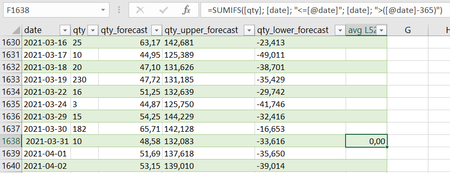
- Apr 02, 2021
Please use "<="&[@date] instead of "<=[@date]", etc. Second one literally returns the text inside the quotes which definitely couldn't be found.

SergeiBaklan
Apr 02, 2021Diamond Contributor
Please use "<="&[@date] instead of "<=[@date]", etc. Second one literally returns the text inside the quotes which definitely couldn't be found.
 bartvanaApr 02, 2021Iron Contributor
Thank you, that definitely clears up one problem. I adapted accordingly, but I must still be making some stupid mistake because the value still remains zero although the sum shouldn't be:
(edit: added the spreadsheet)
- bartvanaApr 02, 2021Iron ContributorOK, got it myself, the type of the date column in the Power Query that makes the table was "text", when I changed it to "date" it worked.
- SergeiBaklanApr 02, 2021Diamond Contributor
Yes, in general it's the best practice to define proper types returning the table to Excel sheet or to other source.