Forum Discussion

Colin_Padwick
Aug 07, 2023Copper Contributor
Sumifs return incorrect result
Hi Tech Community I wonder if you can help me? I have a spreadsheet which uses sumifs, but it seems that the results returned are not always correct. I am not sure how to attach the sprea...
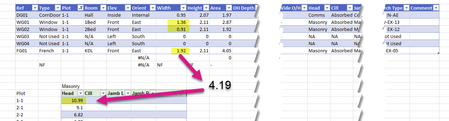
- Aug 07, 2023I'm guessing you didn't enter it as forced text (either '1-1 or into cells pre-formatted as text) and therefore Excel assumed those to be dates and in the case of 1-1 that is Jan 1 (this yr) and in the case of 1-23 it is Jan 2023 (and assumed the 1st) and hence BOTH 1-1 and 1-23 resulted in 2023-01-01 as the date value and hence the same value. but that is just my guess. In the other cases the Month-Day (of this year) and the Month-Year values didn't overlap so there wasn't an issue.

Colin_Padwick
Aug 07, 2023Copper Contributor
After some tinkering around it would seem that SUMIF and SUMIFS did not like how the plot numbers were entered.
The cells were formatted as text and the notation was block number, dash, plot number (e.g. 1-1, 1-2, 1-3.....1.10, 1.11.....). Somehow this confused the formula and for example for plot 1-1 it was summing plots 1-1 and 2-23. Most other plots were summing correctly.
I have since changed the notation to block number, dot, plot number and placed a leading zero to plots under 10 (e.g. 1.01, 1.02......1.10,1.11.....).
SUMIFS seem to be happy with this and reporting the correct totals for each plot. It is odd as the cells are still formatted as text.
I am happy with this workaround but it would be nice to know why SUMIFS didn't like the dash notation.
The cells were formatted as text and the notation was block number, dash, plot number (e.g. 1-1, 1-2, 1-3.....1.10, 1.11.....). Somehow this confused the formula and for example for plot 1-1 it was summing plots 1-1 and 2-23. Most other plots were summing correctly.
I have since changed the notation to block number, dot, plot number and placed a leading zero to plots under 10 (e.g. 1.01, 1.02......1.10,1.11.....).
SUMIFS seem to be happy with this and reporting the correct totals for each plot. It is odd as the cells are still formatted as text.
I am happy with this workaround but it would be nice to know why SUMIFS didn't like the dash notation.

mtarler
Aug 07, 2023Silver Contributor
I'm guessing you didn't enter it as forced text (either '1-1 or into cells pre-formatted as text) and therefore Excel assumed those to be dates and in the case of 1-1 that is Jan 1 (this yr) and in the case of 1-23 it is Jan 2023 (and assumed the 1st) and hence BOTH 1-1 and 1-23 resulted in 2023-01-01 as the date value and hence the same value. but that is just my guess. In the other cases the Month-Day (of this year) and the Month-Year values didn't overlap so there wasn't an issue.
- Colin_PadwickAug 07, 2023Copper Contributor
The cells were preformatted as text, but not necessarily had the preceeding '.
Your date theory sounds plausible to me.
I have made a mental note not to use numbering scheme that could look like a date to Excel.
Thanks for your help.
- SergeiBaklanAug 14, 2023Diamond Contributor
Excel considers as text any value if the cell is formatted as text and the value preceding with ' if any other format is applied to the cell.
