Forum Discussion

Sumifs return incorrect result
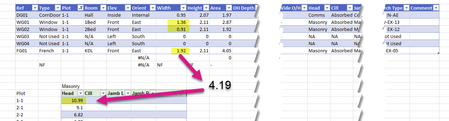
- Aug 07, 2023I'm guessing you didn't enter it as forced text (either '1-1 or into cells pre-formatted as text) and therefore Excel assumed those to be dates and in the case of 1-1 that is Jan 1 (this yr) and in the case of 1-23 it is Jan 2023 (and assumed the 1st) and hence BOTH 1-1 and 1-23 resulted in 2023-01-01 as the date value and hence the same value. but that is just my guess. In the other cases the Month-Day (of this year) and the Month-Year values didn't overlap so there wasn't an issue.


Better if you share the formula for the cell in question.
And what is "reduced table" - you mean you physically removed some rows from the initial table? If you mean filtered table - filter doesn't affect SUMIFS().

The formula for the cell in question is
=SUMIFS(Table2[Width],Table2[Plot],$B386,Table2[Head],$D$384)
I reduced the table by using the resizing handle in the right hand lower corner.
It is not a filter but defines the size of the table.
- SergeiBaklanAug 07, 2023Diamond Contributor
- Colin_PadwickAug 07, 2023Copper Contributor
- SergeiBaklanAug 07, 2023Diamond Contributor
I tried to play with different scenarios and can't reproduce, sorry. It looks like recalculation doesn't work in your case. You may try Ctrl+Alt+Shift+F9 if it updates the formula.
On that step if only to play with your file, if you may share it removing sensitive information, or someone else here have more ideas.