Forum Discussion

SUMIFS help
- May 20, 2022
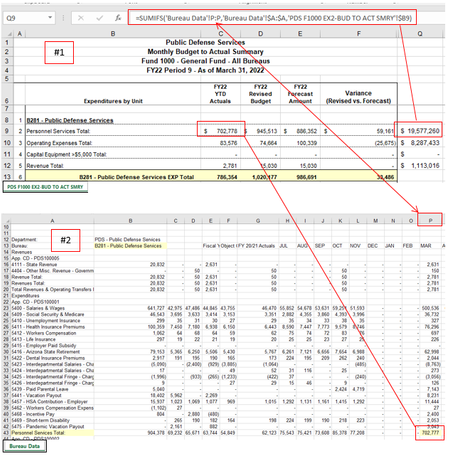
Thomas Hochard On the Bureau Data sheet I would insert a column B where you enter the number for each bureau. Hide the column if you don't want to see it all the time.
Then the formula I C8 on the PDS sheet can be as follows (note that you don't need the sheet reference for the active sheet when you refer to B8 and B9 in the PDS sheet):
=SUMIFS('Bureau Data'!Q:Q,'Bureau Data'!$A:$A,$B9,'Bureau Data'!$B:$B,Sheet1!$B$8)The formula you tried looks for the bureau number/name (B8 in the PDS sheet) in column A on the data sheet. But, there are no cells in that column A that contain the bureau numbers/name. Hence, zero. And that's why you need to insert a column where every row has the bureau number/name.
In summary, the above formula looks for the amounts in column Q (shifted one to the right), for items where column A contains the expense type AND column B the bureau.
Attached a mock-up of your file with a working example.

Thomas Hochard On the Bureau Data sheet I would insert a column B where you enter the number for each bureau. Hide the column if you don't want to see it all the time.
Then the formula I C8 on the PDS sheet can be as follows (note that you don't need the sheet reference for the active sheet when you refer to B8 and B9 in the PDS sheet):
=SUMIFS('Bureau Data'!Q:Q,'Bureau Data'!$A:$A,$B9,'Bureau Data'!$B:$B,Sheet1!$B$8)The formula you tried looks for the bureau number/name (B8 in the PDS sheet) in column A on the data sheet. But, there are no cells in that column A that contain the bureau numbers/name. Hence, zero. And that's why you need to insert a column where every row has the bureau number/name.
In summary, the above formula looks for the amounts in column Q (shifted one to the right), for items where column A contains the expense type AND column B the bureau.
Attached a mock-up of your file with a working example.

I got it to work and I appreciate your awesomeness!
Thank you, Thomas