Forum Discussion

SUMIFS excluding duplicate values
- Mar 16, 2020
Couple of more variants if only I understood the logic correctly
with
=SORT(UNIQUE(FILTER(B2:B350,B2:B350<>"")))and
=SUM(INDEX($D$2:$D$350,XMATCH($F345&UNIQUE(FILTER($C$2:$C$350,$B$2:$B$350=$F345)),$B$2:$B$350&$C$2:$C$350,0)))Another one is simple Power Query (Sheet2)

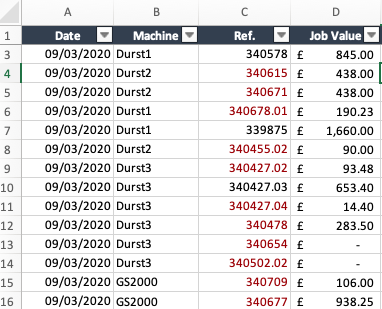
Which is returning the value of £14,052.68 for "Durst1", whereas it should be £20,873.55.
That can be achieved by a simple SUMIFS():
=SUMIFS($D$2:$D$342,$B$2:$B$342,F345)

Detlef_Lewin , that doesn't exclude duplicates in column C
- A819A1LMar 17, 2020Brass Contributor
Hi All,
Thank you for your input! Both solutions work well.
Apologies if I wasn't clear enough, it's a new problem that I hadn't come across before and wasn't sure how to explain it. The reason why I need a formula to calculate the result is because the master spreadsheet I am using will be updated over several days. The desired outcome is to have a summary page for all machines that would update with any new data.
Thanks again.
- Detlef_LewinMar 16, 2020Silver Contributor
Well, it's the desired result.
Perhaps it would have been better if the thread opener had given the desired results for the other machines as well.
