Forum Discussion

Bailey317
Dec 07, 2021Copper Contributor
SUMIF using non-contiguous cells
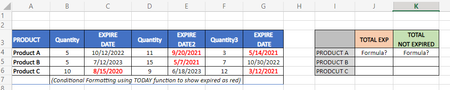
I am looking for help in how to structure a formula to sum the amounts based on expiration dates. I am stumped on how to use the SUMIF function for what I am trying to do or if that is even the corr...
 Dec 08, 2021
=SUMPRODUCT(((C4<TODAY())*B4)+((E4<TODAY())*D4)+((G4<TODAY())*F4))
You could use sumproduct function.
OliverScheurich
Dec 08, 2021Gold Contributor
=SUMPRODUCT(((C4<TODAY())*B4)+((E4<TODAY())*D4)+((G4<TODAY())*F4))
You could use sumproduct function.
 Bailey317Dec 08, 2021Copper ContributorThank you!! That worked. I really appreciate your help on this.
After playing around and testing I also was able to figure out that the following works as well:
=SUM(IF(C5<TODAY(),B5)+IF(E5<TODAY(),D5)+IF(G5<TODAY(),F5))
Thank you so much again for all your help.