Forum Discussion

Bailey317
Dec 07, 2021Copper Contributor
SUMIF using non-contiguous cells
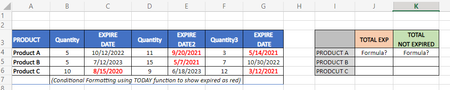
I am looking for help in how to structure a formula to sum the amounts based on expiration dates. I am stumped on how to use the SUMIF function for what I am trying to do or if that is even the corr...
 Dec 08, 2021
=SUMPRODUCT(((C4<TODAY())*B4)+((E4<TODAY())*D4)+((G4<TODAY())*F4))
You could use sumproduct function.

Detlef_Lewin
Dec 07, 2021Silver Contributor
or if that is even the correct function to use.
The real question should be: Is this the right setup for a SUMIF() formula?
And the answer would be: No.
You always want to use a list of records:
Product - Quantity - Expire date
Then a column "Expired?" with the formula you used in the conditional formatting.
Then you could do the SUMIF() or even a pivot table.